
User guide






56 Document No. 001-64846 Rev. *A Getting Started with CapSense®
4.1.3 CapSense Plus (Programmable Solutions)
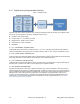
Figure 4-1 CapSense Plus
CapSense Plus devices feature capacitive touch sensing and additional system functionality. Using CapSense Plus
devices can result in significant cost savings. Additional features include:
Feedback - LED, Audio, Haptics
Communication - I
2
Digital functions - PWM, Counters, Timers
C, TX8, UART, SPI, USB
Analog functions - ADC, Comparator
Bootloaders
4.1.3.1 CY8C20xx6A, CapSense Plus
CY8C20xx6A devices can operate at voltages as low as 1.71 V to 5 V, offer both CSA_EMC and CSD capacitive
sensing and SmartSense, and support up to 33 CapSense buttons, USB, I
2
4.1.3.2 CY8C21x34/B, CapSense Plus
C, SPI., and up to 32-KB Flash memory.
CY8C21x34 devices feature CSD capacitive sensing and SmartSense sensing (CY8C21x34B) with advanced digital
and analog peripherals, are water tolerant, and can support up to 24 CapSense buttons.
4.1.3.3 CY8C24x94, CapSense Plus
CY8C24x94 devices feature CSD capacitive sensing, proximity sensing, are water tolerant, support a wide range of
interfaces (SPI, I
2
4.1.3.4 Dynamic Reconfiguration
C USB 2.0 and UART), and can support up to 44 CapSense buttons.
Dynamic reconfiguration is a clever way to optimize total system cost. There are situations in which the number of
digital and analog blocks required by a particular application exceeds the resources of the chip. In these situations, it
may be possible to time-share the analog and digital blocks. The process of reusing analog and digital resources at
different points in time is called dynamic reconfiguration. If the application requires CapSense, an ADC, and a
counter, but not all at the same time, reconfiguring the hardware blocks dynamically will enable all features to be
implemented. For more information about dynamic reconfiguration, see the Cypress application note CapSense
PLUS Dynamically Configuring CapSense.