
User guide




24 Document No. 001-64846 Rev. *A Getting Started with CapSense®
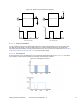
Figure 2-27. Implementing LCD Feedback with CapSense using PSoC
2.7.2 Haptic Feedback
Haptic, or tactile, feedback uses vibration to let the user know that a finger touch has been detected by the system.
Vibrations are created by an actuator (DC motor) with Eccentric Rotating Mass (ERM). By using a PWM and a timer
in the CapSense controller, different kinds of tactile feedback can be generated.
2.7.3 Audible Feedback
Audible feedback for CapSense buttons is implemented using a buzzer. The Pulse Width Modulator (PWM) can be
used to output the PWM signal required for driving the buzzer as specified in the buzzer data sheet. The PWM user
module available in PSoC is used for this purpose. PSoC can implement CapSense through its CSA and CSD
algorithms. This application note describes CSD implementation. The CSD user module is configured to scan a set of
buttons and sliders. When a button press event occurs, the feedback is provided by driving the buzzer at a particular
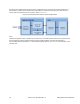
intensity level. The circuit diagram for implementing the buzzer feedback follows.
Figure 2-28. Implementing Audible Feedback for CapSense in PSoC
2.7.3.1 CapSense with Audible Feedback Configuration
Select CSD and PWM8 user module from the User Module list. Set the parameters for the CSD user module as
shown in Table 2-1 on page 25. Calculate the PWM user module parameters based on the buzzer’s resonant
frequency. For example, consider the buzzer CD1206 with a resonant frequency of 2.4 kHz. A 2.4-kHz PWM signal
with a 50-percent duty cycle is required to drive the buzzer to produce proper audio feedback.