
User guide




Getting Started with CapSense Document No. 001-64846 Rev. *A 21
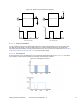
Figure 2-20. LED Sourcing and Sinking Configuration
CapSense Controller
VDD
CapSense
button
R
CapSense Controller
CapSense
button
R
LED
LED
V
src
V
snk
V
src
t
VDD
ON OFF ON
V
snk
t
VDD
ON OFF ON
OFF
OFF
LED in Sourcing Mode
LED in Sinking mode
2.7.1.1.2 Advanced LED Effects
For user interfaces requiring more sophisticated visual effects a single hardware PWM or timer can be used to drive
the LEDs. By varying the duty cycle of the PWM output you can achieve advanced effects such as variable LED
brightness, fading, and breathing. A single hardware PWM or timer can be used to drive multiple LEDs, see AN13943
Multichannel LED Dimmer with CapSense Control for implementation details.
2.7.1.1.3 LED Brightness
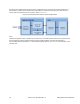
By varying the duty cycle of the PWM output you can adjust the LED brightness as shown in Figure 2-21. This allows
you to adjust your user interface brightness in response to ambient lighting conditions.
Figure 2-21. LED Brightness Control