
User guide




16 Document No. 001-64846 Rev. *A Getting Started with CapSense®
2.5.1.2 Matrix Buttons
In applications requiring a high number of buttons such as a calculator keypad or a QWERTY keyboard, capacitive
sensors can be arranged in a matrix. This allows a design to have more buttons than there are I/O pins on the
CapSense controller.
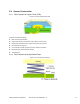
Figure 2-13. Typical Matrix Buttons
A matrix button design consists of two groups of capacitive sensors: Row sensors and Column sensors. When a
button is touched, it can be resolved by identifying the row and column sensors that are both in the TOUCH state.
The number of buttons supported by the matrix is equal to the product of the number of rows and the number of
columns.
= × Equation 4
Using a matrix button design can result in a significant reduction in the number of I/O pins required. For example, the
matrix in Figure 2-13 implements 12 buttons, but requires only seven I/O pins for sensors. An additional one or two
dedicated pins need to be assigned to external components, depending on the sensing method selected.
Matrix buttons can only be sensed one at a time. When more than one row or column sensor is in the TOUCH state,
then the finger location cannot be resolved, and the situation is considered an invalid condition. Some applications
require multiple buttons to be sensed simultaneously, such as a keyboard with a Shift, Ctrl, and Alt key. In this case,
the Shift, Ctrl and Alt keys should be designed as individual buttons, or should be changed to a mutual-capacitance
sensor design.
2.5.2 Sliders (One-dimensional Sensors)
Sliders are used for controls requiring gradual adjustments. Examples include a lighting control (dimmer), volume
control, graphic equalizer, and speed control. A slider is built using an array of capacitive sensors called segments
that are placed adjacent to one another. Actuation of one segment results in partial actuation of physically adjacent
segments. By using an interpolation method called a centroid, you can achieve a higher resolution than the number of
slider segments. In a typical application, a slider with five segments can resolve at least 100 physical finger positions
on the slider. High resolution makes for smooth transitions in light or sound as a finger glides across a slider.