
User guide




Getting Started with CapSense Document No. 001-64846 Rev. *A 15
2.5 Sensor Types
Capacitive sensors can be broadly classified into four categories: buttons, sliders, touchscreens, and proximity
sensors. Different sensor types cater to different market segments
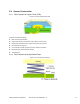
Figure 2-11. Types of Capacitive Sensors
Button (Zero-dimensional) Slider (One-dimensional)
Touchscreen and Trackpad (Two-dimensional) Proximity (Three-dimensional)
2.5.1 Buttons (Zero-dimensional Sensors)
CapSense buttons are used in a wide variety of applications including: home appliances, medical devices, TVs,
monitors, audio systems, photo frames, notebooks, home security systems, white goods, industrial products, and
lighting controls. Use CapSense buttons in place of mechanical buttons for higher reliability, lower cost, and more
appealing industrial design.
2.5.1.1 Simple Buttons
The simplest capacitive sensor consists of a copper pad connected to a CapSense controller pin with a trace. A
button is defined as the combination of the copper sensor pad and the nonconductive overlay material. The button is
surrounded by grounded copper hatch separated by an annular gap. Each button requires one I/O pin of the
CapSense controller.
Figure 2-12. Typical Simple Buttons