
IP Phone 2004 with KEM User Guide

17
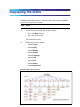
Displaying the menu
Follow this procedure to access the main menu. You must be logged on
to access the main menu system.
Step Action
1
On the IP Phone, perform one of these actions:
• press the Menu soft key
•
press the Services key
The main menu opens.
2
Perform one of these actions:
•
Select Logoff
•
Select Audio
• Select Display . See "Adjusting the display contrast" (page 23).
•
Select Feature
•
Select Language
•
Select Time
•
Select User
•
Select History
•
Select Diagnostics
IP Phone 2004 menu hierarchy