
User manual



There is no special maintenance procedure for CyBro family. There are no spare parts that you can
change yourself. In case of malfunction, you should contact local distributor.
A routine maintenance check (about every one or two months) of PLC and control system is good
practice, and should include the following items:
air temperature - check the ambient air temperature in the control cabinet, so the operating
temperature range of any component is not exceeded.
air filter - if the control cabinet has an air filter, clean or replace it periodically as required.
fuses or breakers - verify that all fuses and breakers are intact.
air vents - verify that all air vents are clear, allowing air to circulate for cooling.
LED - state
POWER LED is OFF
STATUS LED blinks
COMM. LED is OFF while trying
to program
COMM. LED is OFF while trying
to communicate via A-bus
When trying to activate an input
corresponding LED is OFF
Action / Diagnostics
check power supply and terminal connections
RUN/STOP switch in RUN position without valid user program
check communication cable and terminal connection
check programming cable
check wiring, terminal connection and switch
For all other errors please contact local distributor
Hardware maintenance
Troubleshooting
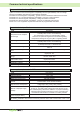
Power LED (green)
IEX-2 LED (red)
on
short blinking
power supply ok
communication ok
none
ActionStatus
none
short blink every 5s
always on
power ok, no communication
no communication
check CyBro-2 and wiring
check wiring
blinking internal error replace module
off
always off
power supply failure
no communication
check power supply and wiring
check CyBro-2 and wiring
28
Hardware maintenance and troubleshooting