
Specifications

9
Instructions For Use
A Fitting & Removing The Plates
To fit the plates:
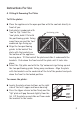
n Place the appliance in the open position with the controls directly in
front of you.
n Each plate is embossed with
‘Low’ or ‘Up’. Select the
‘Low’ plate, hold it flat with
the positioning guides facing
away from you and the ‘Low’
embossed sign facing up.
n Align the two positioning
guides to the back of the
plate with the brackets on
the bottom of the appliance
housing base. Tilt the back of the plate and slide it underneath the
brackets. Push down the front end of the plate until it locks into
place.
n Select the ‘Up’ plate and with the ‘Up’ embossed sign facing up and
the two positioning guides facing away and down. Align the plate
with the brackets on the underside of the lid of the product and push
down the front to the locked position.
To remove the plates:
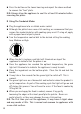
n Locate the plate release buttons on the right
side of the unit’s upper and lower housing.
n Press the Upper release button firmly and the
“Up” plate will pop forward slightly from the
lid. Lift the plate up and slide out from under
the brackets in the centre.
Positioning guides
Upper
Plate
Release
Button
Lower
Plate
Release
Button