
Technical information



Macro-Tech 600/1200/2400 Power Amplifiers
Page 19
4 Operation
4.1 Precautions
Macro-Tech
amplifiers are protected from internal and
external faults, but you should still take the follow pre-
cautions for optimum performance and safety:
1. Improper wiring for Stereo, Bridge-Mono and
Parallel-Mono modes can result in serious oper-
ating difficulties. Refer to Section 3.3 for details.
2. WARNING: Do not change the position of the
stereo/mono switch unless the amplifier is first
turned off.
3. CAUTION: In Parallel-Mono mode, a jumper is
used between the red (+) Channel 1 and 2 out-
put binding posts. Be sure to remove this
jumper for Stereo or Bridge-Mono mode, other-
wise high distortion and excessive heating will
definitely occur. Check the stereo/mono switch on
the back panel for proper position.
4. Turn off the amplifier and unplug it from the AC
mains before removing the
P.I.P.
card.
5. Use care when making connections, selecting sig-
nal sources and controlling the output level. The
load you save may be your own.
6. Do not short the ground lead of an output cable to
the input signal ground. This may form a ground
loop and cause oscillations.
7. Operate the amplifier from AC mains of not more
than 10% variation above or below the selected
line voltage and only the specified line frequency.
8. Never connect the output to a power supply out-
put, battery or power main. Such connections
may result in electrical shock.
9. Tampering with the circuitry by unqualified person-
nel, or making unauthorized circuit changes invali-
dates the warranty.
Remember: Crown is not liable for damage that results
from overdriving other system components.
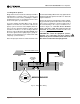
4.2 Indicators
The amber Enable indicator is provided to show that
the amplifier has been turned on (or enabled), and that
its low-voltage power supply and forced-air cooling
system are working. It does not indicate the status of
the high-voltage power supplies. For example, the En-
able indicator will remain lit during unusual conditions
that would cause the amplifier’s protection systems to
LEVEL LEVEL
O
N
O
F
30
27
24
21
18
15
12
9
6
3
0
ENABLECH1 CH2
ODEP
30
27
24
21
9
6
3
0
SIGNAL
/
IOC
18
15
12
Fig. 4.1 Indicators
put a high-voltage power supply in “standby” mode
(see Section 4.3).
The amber
ODEP
indicators confirm the normal op-
eration of Crown’s patented Output Device Emulation
Protection circuitry. During normal operation, they glow
brightly to show the presence of reserve thermal-dy-
namic energy. They dim proportionally as the energy
reserve decreases. In the rare event that there is no
reserve, the indicators turn off and
ODEP
proportion-
ally limits the drive level of the output stages so the
amplifier can continue safe operation even when con-
ditions are severe. (For a more detailed description of
ODEP
, see Section 4.3.1.)
The
ODEP
indicator for the affected channel will turn
off if a high-voltage power supply is put in “standby”
mode, a high-voltage power supply fuse (or breaker)
blows, or a transformer activates its thermal protection
circuitry (see Section 4.3.2). Both
ODEP
indicators turn
off if the amplifier loses AC power, the power switch is
turned off or the low-voltage power supply fuse blows.
The green Signal/
IOC
indicators show signal pres-
ence, distortion and input overload. As signal presence
indicators, they flash with normal intensity in sync with
the output audio signals. As
IOC
(Input/Output Com-
parator) indicators, they flash brightly if there is any
difference between the input and output signal wave-
forms greater than 0.05%. Because transient distor-
tion happens quickly, a 0.1 second “hold delay” keeps
the indicators on long enough to be easily noticed. The
IOC
function essentially provides
proof of distortion-
free performance
. As input overload indicators, they
flash brightly with a 0.5 second hold delay to show that
an input signal is too large and must be clipped at the
input.
Note: The Channel 2 IOC indicator will stay on in
Parallel-Mono mode.
Under abnormal conditions where one of the ampli-
fier’s high-voltage power supplies is temporarily put in
standby mode, the Signal/
IOC
indicators will stay on
with full brightness. They will resume normal operation
when the amplifier is no longer in standby mode.