
Operating Instructions


10
Bluetooth input -Receiver
Listening to IPhone (or other Bluetooth input devices)
1. Turn the volume knob clockwise to turn the equipment on.
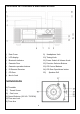
2. Use the function selector to select Bluetooth mode.
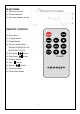
3. Press “Bluetooth”button on panel or remote. LED indication Red color and flashing.
When succeed in connecting, LED color in red and stable.
4. Activate the Bluetooth function in your Bluetooth device (such as Mobile Phone);
the device will enter to Bluetooth searching automatically, if not, tap the relate selec-
tion to manually enter to searching mode.
5-Your Bluetooth device show “CROSLEY CR7010” in list, and then select it for
pairing.
6- Start to music play on your Bluetooth device when the device is in paired and show
connected. (If not, select / tap the relate menu and choose “connect” to connect the
Bluetooth turntable manually. It’s depended on your Bluetooth device version and
designed function.)