
User Manual



12
Ejecting a Record
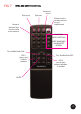
A record that is playing can be ejected at any point by pressing the “eject disc” button
or “eject track” button on the remote control.
Adjusting the volume
To increase or decrease the volume level of the jukebox press the VOL 1 buttons on
the remote up and down.
The ‘VOL 2’ volume keys on the remote are used to adjust the volume of any external
speakers connected to the jukebox.
Please refer to section 6 “Adding additional speakers”.
Mute
Pressing the ‘MUTE’ key on the remote, will instantly mute the amplifier and the display
will show ‘L —‘, To return the volume to the previous level press any of the volume
keys. See FIG 7.
Keyboard Cancel
Should a mistake be made whilst entering selections via the remote control, pressing
KYBRD CANCEL will cancel any numbers entered.
Additional buttons on the remote control
Sound Leisure use a standard remote control for both vinyl and CD jukeboxes.
Therefore some buttons on the remote are not used by the Rocket model or vinyl
versions of the jukebox. These are as follows:
- Diamond Pack lighting is not available on the Rocket Model.
- The standby button is not yet implemented in this version of the jukebox software.
The amplifier selection buttons Juke / Aux 1 (bluetooth) and Aux 2 are explained in
section 5 “Connecting external audio devices”
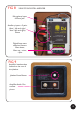
NOTE : To use the infrared remote control - aim it towards the LED display (shown in
FIG 6)