
Manual




Operating Instructions
(continued)
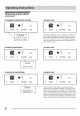
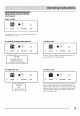
TO OPERATE ON FAN ONLY: YOU WILL SEE:
clean cool
air = econ
fan only
temp/timer
F
®
timer MODE V ON-OFF A
cleon cool
econ
air _ fan only
ten,p/timer
F
®
timer MODE V ON-OFF A
_" DO THIS:
PRESS
MODE BUTTON
CHOOSE
FAN ONLY
Note: Use this function only when cooling is not desired,
such as for room air circulation or to exhaust stale air on
some models. (Remember to open the vent during this
function, but keep it closed during cooling for maximum
cooling efficiency,) You can choose any fan speed you
prefer, (Except "Auto Fan").
During this function, the display will show the actual room
temperature, not the set temperature as in the cooling
mode.
COOL FEATURE:
temp/timer
cleon
air
cool
econ
m fan only
timer MODE
F
O
V ON=OFF A
I \ DO THIS:
PRESS
MODE BUTTON
CHOOSE COOL
YOU WILL SEE:
dean
air
timer
= cool
econ
ion on_
temp/tlmer
F
®
MODE V ON=OFF A
Note: In this mode, the fan remains on all the time with the
compressor cycling on and off when room temperature is
reached.
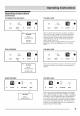
SLEEP FEATURE:
temp/timer
F auto
hi =
reed
Io
V ON=OFF A FAN SPEED
DO THIS;
PRESS
SLEEP BUTTON
filter
reset
sleep
/
YOU WILL SEE:
tcmp/dmer
F auto
hi = filter
med reset
Io
V ON=OFF A FANSPEED sleep
Note: In this mode the selected temperature will increase
by 2 °F 30 minutes after the mode is selected. The tempe-
rature will then increase by another 2 °F after an additional
30 minutes. This new temperature will be maintained for 7
hours before it returns to the originally selected tempera-
ture. This ends the "Sleep" mode and the unit will continue
to operate as originally programmed. The "Sleep" mode
program can be cancelled at any time during operation by
again pressing the "Sleep" button,