
Manual




!!!!!!!!!!!!!!!!!!!!!!!!!!!!!U! :i!: !!
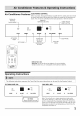
Air Conditioner Features ELECTRONICCONTROL
Before you begin,thoroughly familiarizeyourselfwith the controlpanel and remote
as shown below and all its functions, then follow the symbol for the functions you
CLEAN AIR desire. The unit can be controlled by the touch pad alone or with the remote,
FEATURE DISPLAYS
(some models) TEMPERATURE/TIME CHECK FILTER
_- RESET BUTTON
temp/timer auto
clean cool _ hi filter
econ _ rood reset
air fan only Io
timer MODE V ON-OFF A FAN SPEED s|eeD
SETS MODE AD]USTS SETS FAN
TEMPERATURE SPEED
OR TIME
// v \\
Battery Size: AAA
Warning: Do not mix old and new batteries. Do not mix alkaline,
standard (carbon-zinc), or rechargeable (nickel-cadmium) batteries.
Operating Instructions
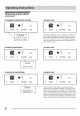
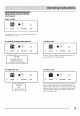
Thefollowing inst!uctions represent the Touch Pad, the same instructions can be used for the Remote Control.
TO TURN UNIT ON:
_ool hi
econ med
fen only Io
MODE V ON-OFF A FANSPEED
\ DO THIS:
PRESS ON/OFF BUTTON I
YOU WILL SEE;
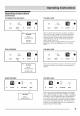
cool
= econ
tan only
romp/timer
F auto =
0 hireed
Io
MODE V ON-OFF A FAN SPEED
Note: The unit will run in energy saver(econ) mode when
used for the first time. In this mode, the fan will continue to
run for 1 minute after the compressor shuts off. The fan then
cycles on for 20 seconds at 10 minute intervals until the room
temperature is above the set temperature, at which time the
compressor turns back on,
5