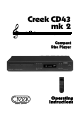
Creek CD43 mk 2 Compact Disc Player Operating Instructions
CD43 mk2 Compact Disc Player C O N G R ATULATIONS ON YOUR PURCHASE Y our new CD43 mk2 Compact Disc Player is designed to provide maximum enjoyment and years of trouble free service. If this is your first CD player, you will find the compact disc system a major step forward in the science of audio technology.
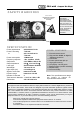
CD43 mk2 Compact Disc Player SAFETY W ARNINGS CAUTION! Invisible laser radiation when top cover is removed. CAUTION PERFORMING ADJUSTMENTS OR PROCEDURES OTHER THAN THOSE SPECIFIED HERE MAY RESULT IN HAZARDOUS EXPOSURE. THE CD PLAYER SHOULD NOT BE REPAIRED BY ANYONE EXCEPT QUALIFIED SERVICE PERSONNEL. Class 1 Laser Product SPECIFICATION Power requirements Power Fuse rating or: AC 220-240 V 50 Hz T 250 mA AC 110-120 V 60 Hz T 500 mA Power consumption 16 Watts max Frequency response 1 Hz - 20 kHz ± 0.
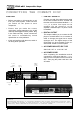
CD43 mk2 Compact Disc Player CONNECTING THE COMPACT DISC CAUTION 1. LINE OUT SOCKETS Connect one end of the interconnect cable to the unit's AUDIO OUTPUT sockets and the other end to the sockets labelled CD or A U X, or to other line inputs on the amplifier. Do not connect it to the amplifier's PHONO input if a phono circuit is installed. u Before connecting or disconnecting a unit from your audio system, make sure that you switch off the power to each component.
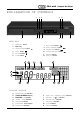
CD43 mk2 Compact Disc Player EXPLANATION OF CONTROLS 2 7 6 8 9 10 3 4 5 11 12 1 MAIN UNIT 1. 2. STANDBY button Disc Tray 3. OPEN/CLOSE button 4. STO P button 5. PA U S E button 6. P LAY button L K 7. 8. 9. 10. 11. 12. J H SKIP BACK button SKIP F O RW A R D button S C A N B A C K button S C A N F O RW A R D button R E P E AT button R A N D O M button G M N A B C D E F DISPLAY WINDOW A. B. C. D. E. F. G.
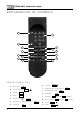
CD43 mk2 Compact Disc Player EXPLANATION OF CONTROLS A I B J C K L D E M F N G H P REMOTE CONTROL UNIT 6 A. STA N D B Y B. OPEN/CLOSE STBY DISC C. INTRO D. FA S T E. R E P E AT A ↔ B F. SHUFFLE / RANDOM PLAY G. R E P E AT SCAN FAST REP A/B H. PA U S E I. NUMERICAL track selection J. REMAINING TIME K. PROGRAM L. SEARCH PAUSE TIME PROG M. SKIP TRACK SHUF 0-9 N. PLAY PLAY P.
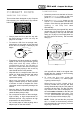
CD43 mk2 Compact Disc Player C O M PACT DISCS HANDLING THE DISCS This unit has been designed to play Compact Discs bearing the identification logo shown below. DVD discs cannot be played. u Always place the CD in the disc tray with the label facing up. CD’s can only be played on one side. u To remove a CD from its storage case, press down on the centre of the case and lift the disc out, holding it carefully by the edges. LOADING DISCS 1. Switch the power on at the back of the unit.
CD43 mk2 Compact Disc Player REMOVING THE DISC The disc tray can be opened at any time by pressing the O P E N / C L O S E button. Remove the disc only after the tray has fully opened. CAUTION u Do not put anything except a Compact Disc into the tray. Foreign objects can damage the mechanism. DVD’s will not play. u Do not force the tray by hand during the opening and closing operations. u To avoid dirt and dust entering the mechanism, keep the disc tray closed when the CD player is not in use.
CD43 mk2 Compact Disc Player playing from the beginning of the first track. You may also go straight to a specific track by using one of the SKIP buttons or . In this case the disc will start playing the selected track when the PLAY button is pressed. The numeric keys on the remote handset allow direct access to the desired track. 7. At the end of the last track the CD will return to a waiting mode.
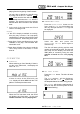
CD43 mk2 Compact Disc Player Press the STOP button. The disc will stop playing, the PLAY symbol will disappear and the track indicator will show the total number of tracks. The time indicator will display the total playing time. When the TIME button is pressed for the third time, the time indicator will return to the elapsed time of the track being played. TO PAUSE THE DISC PLAY Press the PAUSE button. The disc will stop playing at the current play position and the PAUSE symbol will be displayed.
CD43 mk2 Compact Disc Player The CD player will skip ahead to the next track each time the or button is pressed. Continuously pressing the or button makes the CD player skip ahead through the disc, track by track, until you reach the desired place. The CD player can be advanced to the last track in this way. When the last track is reached, the CD player will return back to track 1. ‘SKIP BACK TRACK Disc play will start from track 3.
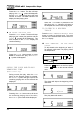
CD43 mk2 Compact Disc Player TO SEARCH QUICKLY FOR A starts at the end of the current track. PARTICULAR POINT O F A TRACK PROGRAMMED DISC PLAY During P L AY mode press and hold the or buttons for fast-forward and fast-back operation. This feature allows you to play tracks in your preferred sequence. During P L AY mode: When or button is pressed, the sound will be muted to about 1/4 of the normal volume level for the duration of the fast-forward or fastback operation.
CD43 mk2 Compact Disc Player playing. 2. Press twice the OPEN/CLOSE button on the front or DISC button on the handset. This will clear the memory and the player will be ready to play again. Enter the third choice - track 8 in the same way. Press the PROG button to store the third choice. NOTE: The memory will be cleared if the power is switched off on the rear panel. Press the P L AY button. The first programmed track will start playing. LISTENING TO A PROGRAMMED SEQUENCE 1. Press the P L AY button.
CD43 mk2 Compact Disc Player mode while the disc is playing. At the end of the last track the disc will automatically return to the beginning of the first track and will continue playing until R E P E AT ALL is cancelled. R E P E AT DISC PLAY Use the R E P E AT button to repeat the disc play of a track, all tracks on the disc, or a programmed sequence of tracks. REPEAT ONE TRACK Make sure that the P R O G R A M function has not been selected. 1.
CD43 mk2 Compact Disc Player TROUBLESHOOTING GUIDE If you have followed the instructions, and are having difficulty operating your compact disc player, please use the simple guide below to help you solve the problem. Here we have listed the most common hiccups experienced by the users, which we hope will be of some help. Locate the SYMPTOM in table below and then check the corresponding POSSIBLE CAUSE and CORRECTIVE ACTION to remedy the problem.
2 Bellevue Road, Friern Barnet, London N11 3ER, England Tel: + 44 + (0)20 - 8361 4133 Fax: + 44 + (0)20 - 8361 4136 E-mail: info@creekaudio.co.uk Internet: www.creekaudio.co.uk Creek Audio Limited reserves the rights to modify or change the specification of its products without notice.