
User`s guide


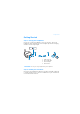



Press the Connect button on your first headphones 7
Step 2: Press the Connect button on your first headphones
This must be done within three minutes after pressing the Connect button
on the transmitter (Step 1). Once the transmitter and headphones are
paired successfully, the Link LED on both units light up green and remain
on. The first receiver to be paired will be assigned to Zone 1.
Perform the following steps to pair additional headphones:
Step 3: Press the Connect button on your transmitter
again
The transmitter’s Link LED flashes.
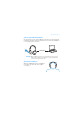
Step 4: Press the Connect button on your second head-
phones
Once the transmitter and the second headphones are paired successfully,
the Link LEDs on both units light up green and remain on. Repeat the steps
to pair your third and fourth headphones (if applicable) manually.
NOTE
If your transmitter and heaphones do not pair, simply reset them.
On one unit at a time, press and hold the Connect button for five
seconds.
USB