
Programming instructions




3 1409
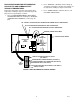
1. Press ‘‘AUTO 1’’, ‘‘WASH 1,’’ and ‘‘BLEND 1’’control
switches (see Figure 1) at the same time and hold
them pressed for a minimum of 1/2 second to bring
up MAIN MENU SELECTIONS on message display.
The word ‘‘CLOCK’’ will appear on display. You are
now in the MAIN MENU SELECTIONS as shown in
Table 1. To advance through the MENU SELEC-
TIONS, repeatedly press the ‘‘CANCEL DEFROST’’
(ADVANCE) switch. Once you reach the desired
selection, Press the ‘‘DEFROST’’ (SELECT) switch
to lock in on the selection.
NOTE: to exit MENU SELECTION and go back to
MAIN MENU SELECTIONS, press ‘‘ERROR RESET’’
(RESET) switch. Press ‘‘ERROR RESET (RESET)
switch a second time to exit from MAIN MENU
SELECTIONS.
SETTING ‘‘CLOCK’’ (TIME OF DAY)
NOTE: The ‘‘CLOCK’’ (TIME OF DAY) must be pro-
grammed into Unit before ‘‘DEFROST’’ (AUTOMAT-
IC), ‘‘SLEEP’’ (SLEEP TIME), and ‘‘WAKE UP’’ (WAKE
UP TIME) can be programmed into the Unit.
Program ‘‘CLOCK’’ (TIME OF DAY) into Unit as follows:
1. Refer to PROGRAMMING MAIN MENU SELEC-
TIONS ONTO MESSAGE DISPLAY and bring up
‘‘CLOCK’’ on display. Press ‘‘DEFROST’’ (SELECT)
switch to lock in on selection.
2. Press ‘‘CANCEL DEFROST’’ (ADVANCE) switch to
bring up flashing hour number on display.
3. Press ‘‘CANCEL DEFROST’’ (ADVANCE) switch to
advance hours on display to desired hour. Press
‘‘DEFROST’’ (SELECT) switch to lock in hour on
display.
4. After hour (time of day) has been locked in on mes-
sage display, minute numbers will be flashing on
display. Press ‘‘CANCEL DEFROST’’ (ADVANCE)
switch to advance minute numbers to desired min-
utes (time of day). Press ‘‘DEFROST’’ (SELECT)
switch to lock in minute (time of day) on display.
5. Press ‘‘ERROR RESET’’ switch two times to exit
from MENU SELECTION.
PROGRAMMING ‘‘DEFROST’’ (AUTOMATIC)
SETTINGS INTO UNIT.
The automatic defrost system may be programmed into
the Unit to occur up to nine different times during a day
with a minimum of two hours between defrost time set-
tings. Program automatic defrost time settings into the
Unit as follows:
1. Refer to PROGRAMMING MAIN MENU SELEC-
TIONS ON TO MESSAGE DISPLAY and bring up
‘‘DEFROST’’ on message display. Press ‘‘DE-
FROST’’ (SELECT) switch to lock in on selection.
2. Press ‘‘CANCEL DEFROST’’ (ADVANCE) switch to
bring up flashing hour number on display.
3. Press ‘‘CANCEL DEFROST’’ (ADVANCE) switch to
advance hours on display to desired hour. Press
‘‘DEFROST’’ (SELECT) switch to lock in hour on
display.
4. After hour (time of day) has been locked in on mes-
sage display, minute numbers will be flashing on
display. Press ‘‘CANCEL DEFROST’’ (ADVANCE)
switch to advance minute numbers to desired min-
utes (time of day). Press ‘‘DEFROST’’ (SELECT)
switch to lock in minute (time of day) on display.
5. Press ‘‘DEFROST’’ (SELECT) switch, then repeat
steps 2, 3, and 4 to program in next defrost time
setting. MAKE SURE A MINIMUM OF TWO
HOURS IS MAINTAINED BETWEEN DEFROST
TIME SETTINGS. IF A TIME SETTING OF LESS
THAN TWO HOURS IS PROGRAMMED INTO THE
UNIT, A MOMENTARY ‘‘ERROR’’ MESSAGE WILL
APPEAR ON THE MESSAGE DISPLAY WHEN
OPERATOR TRIES TO EXIT ‘‘DEFROST’’. THE
PROGRAM WILL NOT ALLOW THE OPERATOR
TO EXIT THE DEFROST SETTING UNTIL THE
LESS THAN TWO HOUR DEFROST TIME IS
CORRECTED. THE OPERATOR MUST PRESS
‘‘CANCEL DEFROST’’ (ADVANCE) SWITCH,
THEN REPEAT STEPS 2, 3, AND 4 TO PROGRAM
CORRECTED DEFROST TIME INTO UNIT.
6. Repeat steps 5 as many times as necessary to pro–
gram desired number of defrost time settings into
the Unit.
7. Press ‘‘ERROR RESET’’ switch two times to exit
from MENU SELECTIONS.
PROGRAMMING ‘‘SLEEP’’ (SLEEP TIME) INTO
UNIT.
‘‘SLEEP’’ (SLEEP TIME) may be programmed into Unit
to occur any time of the day after the Unit automatic de-
frost cycle has occurred. Unit will shut down (go into
sleep time) and will not wake up (return to normal opera-
tion) until programmed ‘‘WAKE UP’’ (WAKE UP TIME)
has occurred. Program ‘‘SLEEP’’ (SLEEP TIME) into Unit
as follows:
1. Refer to PROGRAMMING MAIN MENU SELEC-
TIONS ONTO MESSAGE DISPLAY and bring up
‘‘SLEEP’’ on message display. Press ‘‘DEFROST’’
(SELECT) switch to lock in on selection.
2. Press ‘‘CANCEL DEFROST’’ (ADVANCE) switch to
bring up flashing hour number on display.