
User's Manual




Adjusting your lcd monitor
8
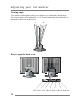
User controls
Front control buttons
AUTO MENU SELECT DOWN UP POWER/ LED
No. Key name Description
1 AUTO
Activates the auto adjustment function.
2 MENU
Opens the OSD menu.
3 SELECT
Selects the main menu items and sub-menu items.
4
◀
Moves to the lower menu item or sub-menu item.
Decreases the value of the parameter.
5
▶
Moves to the upper menu item or sub-menu item.
Increases the value of the parameter.
6 POWER
Turns on/off the monitor.
7 LED
Indicates the status of the monitor.
• Green : Normal operation.
• Amber : Power saving mode or disconnected signal
cable.