
Instruction Manual




4/8/16-CH DVR Quick Start Guide
1
1. Install Hard Drive
Notice: 1.This series support 1 SATA hard drives. Please use the hard drive the manufacturers
recommend specially for security and safe field.
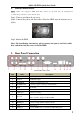
Step1: Unscrew and Open the top cover.
Step2: Connect the power and data cables. Place the HDD onto the bottom case as
below.
Step3: Mount the HDD.
Note: For installation convenience, please connect the power and data cables
first, and then wind the screws to fix the HDD.
2. Rear Panel Connection
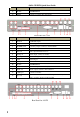
Rear Panel for 4-CH
Item
Name
Description
1
Audio out
Audio output, connect to the sound box
2
Audio in
4 CH Audio input
3
ALARM IN
Connect to external sensor 1-4
4
ALARM OUT
1-ch relay output. Connect to external alarm
5
GND
Grounding
6
Video in
Video input channels from 1-4
7
CVBS port
Connect to monitor
8
Spot out
Connect to monitor as an AUX output channel by channel.
Video would be displayed without OSD.
9
VGA port
VGA output, connect to monitor
10
HDMI port
Connect to high-definition display device
11
LAN
Network port
12
USB port
Connect USB mouse or connect external USB devices