
Technical data

4-16 Using the System Controller
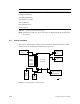
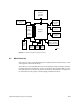
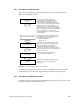
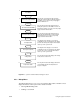
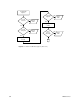
Figure 4-7 System Controller Menus: Debug Settings
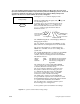
Pressing the Execute button displays 16 bits:
Scroll
Debug Settings
0 0 0 0 0 0 0 0 0 0 0 0 0 0 0
0
A flashing cursor appears under the bit at the far
right of the display. The Scroll buttons move
the cursor back and forth across the screen. The
Execute button toggles the bit. The bits are
defined as follows:
Manu-mode
No bootmaster
arbitration
POD
mode
No diagnostics
0 0 0 0 0 0 0 0 0 0 0 0 0 0 0 0
The bits are numbered from right to left, starting with
“0” and ending with “f.”
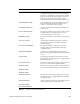
The “PROM Debug Mode” switch displays additional
debugging information.
PROM Debug
Second IO4
Do Not Clear Mem
Default NVRAM
The “Second IO4” switch causes the PROM to see the
IO4 board in the second highest slot as the master IO4.
The “Do Not Clear Memory” switch instructs the
PROM not to run BIST on reset. Use to debug after a
system crash.
Power cycle the system to install the new settings.
The “No bootmaster arbitration” switch prevents
the System Controller from selecting a processor
to communicate with. This allows the individual
processors to communicate via the “CC UART”
connectors located on the IP19 board edge.
The “POD mode” switch forces the IP19 PROM
to stop initialization just before it would have loaded
the IO4 PROM and jump to POD mode instead. Useful
on a system with a bad IO4 board or PROM.
The “No diagnostics” switch prevents the system
from running power-on diagnostics.
The “Manu-mode” switch sends all IP19 PROM
console output to the external UART on the System
Controller (External Controller Serial).
The “Default NVRAM Values” switch forces the PROM
to use the default values for various environment
variables, instead of reading them from the NVRAM.
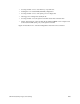
The default values are:
dbaud
rbaud
fastmem
9600
19200
0
The default console baud rate
The alternate port baud rate
The memory configuration
algorithm
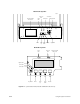
To access the Debug Settings menu: First turn the key switch to the On position. Press the Scroll
Up and Scroll Down buttons simultaneously. Turn the key switch to the Manager position. Press both
scroll buttons simultaneously again. Scroll through the menus until the Debug Settings menu
appears. If the menu is not selected within 30 seconds, it disappears.