
Technical data

4-14 Using the System Controller
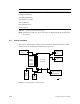
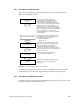
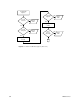
Figure 4-6 System Controller Menus: Manager Position
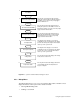
4.5.3 Debug Menu
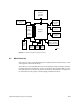
The Debug Menu allows you to set several switches that enable or disable various
diagnostic features of the system. These features include:
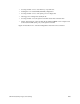
• entering PROM debug mode
• enabling a second IO4
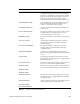
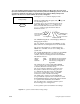
Pressing the execute button toggles between
turning the external cabinet on and off. Each time
the button is pressed, the menu prompt toggles
between "Off" and "on."
Pressing the Execute button toggles between
turning the optional second SCSIbox on and off.
Each time the button is pressed, the menu prompt
toggles between "Off" and "On."
Pressing the Execute button toggles between
turning the standard SCSIbox on and off. Each
time the button is pressed, the menu prompt
toggles between "Off" and "On."
Selecting this menu displays a second-level
confirmation menu. Pressing the Execute button
performs the interrupt. Pressing the Menu button
returns you to the system menu.
Selecting this menu displays a second-level
confirmation menu. Pressing the Execute button
performs the reset. Pressing the Menu button
returns you to the system menu.
Pressing the Execute button displays the voltage
menu (refer to Section 2.2.1).
Pressing the Execute button displays the blower
speed in RPMs and the inlet temperature in
degrees centigrade.
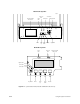
Boot Status
Scroll
Turn Internal SCSI B Off/On
6.
Turn External Cabinet Off/On
Scroll
5.
4.
Turn Internal SCSI A Off/On
7.
Scroll
Backplane NMI
8.
Scroll
Reset System (SCLR)
9.
Scroll
Voltage Status
10.
Scroll
Temperature Status
11.
Scroll