
Technical data

CHALLENGE/Onyx Diagnostic Road Map 4-11
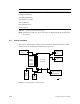
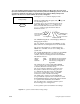
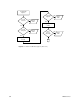
Figure 4-3 Rackmount System Controller Sensors
4.5 Menu Hierarchy
This section provides a sequential listing of the available System Controller menus, as well
as descriptions of the menu functions.
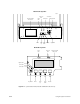
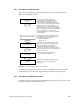
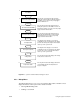
The menus are accessed and their functions executed using four function buttons. Press the
Scroll Up and Scroll Down buttons to locate a specific menu. Press the Menu button to view
the selected menu. Press the Execute button to perform the menu function. See Figure 4-5
for an illustration of the System Controller display and function buttons.
Terminator
Midplane
System
Controller
Voltage
Termination
1.5 Volt
Regulation
External SCSI
Rack
Air Inlet
Temperature
Sensor
Rotary Blower
Fan A
Rotary Blower
Fan B
Keyswitch, Function
Buttons, Graphics
Display/Status Panel
Offline
Switcher
(OLS2)
Offline
Switcher
(OLS3)
Offline
Switcher
(OLS1)
Internal
SCSI
Rack
Terminator
Secondary
Backplane
Sensor