
Technical data


4-8 Using the System Controller
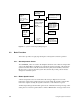
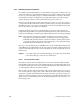
• Plug your laptop into the System Controller port, labeled External Controller
Serial, using the cable permanently attached to the port. On rack-mounted systems,
this port is located in the lower left corner of the midplane (when facing the front of
the chassis). Deskside systems have the port located in the lower right corner of the
backplane (when facing the rear of the chassis).
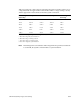
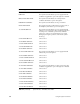
Error Message Error Meaning
SYSTEM ON The System Controller reports the
power-on sequence completed.
SYSTEM OFF The System Controller reports the
power-off sequence completed.
SYSTEM RESET The System Controller generates a backplane reset, due
to menu selection or serial port request.
NMI The System Controller generates a backplane NMI, due
to menu selection.
SCLR DETECTED The System Controller detects a backplane reset, then
initiates the bootmaster arbitration process.
BOOT ERROR System Controller bootmaster arbitration could not find
any host CPU responding on the serial bus. The System
Controller is not able to communication with the host
CPU. The host CPU may not be running or may continue
to boot normally.
INVALID CPU COMMAND The System Controller detects bad command syntax
from the host CPU on the Serial Bus. The command is
ignored.
Table 4-4 System Events
– Informative
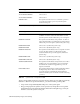
Error Message Error Meaning
BAD MSG: CPU PROCESS The CPU or System Controller process has received an
invalid message.
BAD MSG: DISPLAY The display process has received an invalid message.
BAD MSG: POK CHK The power OK check process received an invalid
message.
BAD MSG: SEQUENCER The sequencer process has received an invalid message.
BAD MSG: SYS MON The system monitor process has received an invalid
message.
Table 4-5 System Controller Internal Problems