
Technical data


CHALLENGE/Onyx Diagnostic Road Map 4-5
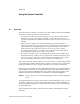
4.3 Error Messages
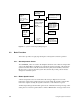
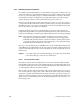
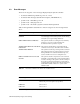
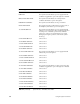
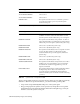
There are six categories of error messages displayed by the System Controller:
• bootmaster arbitration problems at power-on or reset
• bootmaster CPU messages (described in Chapter 5, “PROM Monitor”)
• system events – immediate power-off
• system events – delayed power-off
• system events – informative, System Controller internal problems
Table 4-1 through Table 4-5 describe five of the six categories of error messages listed
above.
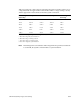
Master CPU Selection Message Context and Meaning of Message
BOOT ARBITRATION HAS NOT
STARTED
This message is briefly displayed at power-on and at
reset. It disappears unless the System Controller debug
switch, bit 6, is set (preventing arbitration).
BOOT ARBITRATION IN PROGRESS The System Controller is scanning all slots and CPUs,
looking for a response on the Serial Bus. The
bootmaster CPU is expected to respond.
ARBITRATION COMPLETE SLOT OXZZ
PROC OXZZ
The System Controller finds a responding CPU. It
continues to listen only to this CPU on the Serial Bus.
ARBITRATION ABORTED The System Controller stops looking for the bootmaster
CPU. This happens if any status panel key is pressed
during arbitration. To restart the arbitration process,
use the “SCLR” menu to issue a backplane reset.
BOOT IS INCOMPLETE FAULT IS NO
MASTER
The System Controller completes ten scans of all slots
and finds no responding CPU on the Serial Bus. Either
no CPU is running or the System Controller is faulty. If
the System Controller has failed, the system will boot
normally, but the CPU histogram will not be displayed
and the IRIX SYSLOG will show no system serial
number found.
Table 4-1 Bootmaster Arbitration Problems at Power-On or Reset
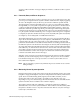
Error Message Failure Area/Possible Solution
POKA FAIL The System Controller detects a power supply fault and
initiates the power-off sequence (except 48 V).
POKB FAIL Same as above.
POKC FAIL Same as above.
Table 4-2 System Events
– Immediate Power-Off