
Technical data

2-36 Diagnostic Procedures
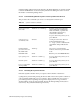
2.7 Known Problems
This section lists some known hardware and software problems, as of this writing.
2.7.1 IRIX 5.0.1
Bugs in IRIX 5.0.1 can cause software hangs. Try to move the customer to the latest release
of the IRIX operating system.
2.7.2 Paging and File Quotas
If the customer is not using paging and file quotas, make sure the customer’s system is
running IRIX 5.2 (plus patch 0 and patch 22) or later.
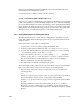
2.7.3 MC3 Clock Jitter
A likely cause of hangs is the MC3 board clock jitter problem. Diagnose it by examining the
HARDWARE ERROR STATE of the MC3. Section 2.5.5 shows how to identify it, with the
pod dmc command.
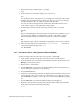
MC3 clock jitter is usually indicated by the following error message:
WARNING: (Kernel) Bus Error Exception ...
HARDWARE ERROR STATE
+ MC3 in slot s
+ MA EBus Error register: 0x4
+ 2: My EBus Data Error
+ IP19 in slot s
+ CC in IP19 slot s, cpu c
+ CC ERTOPI Register: 0x10
+ 4:Parity Error on Data from D-chip
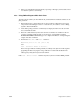
The part of this message that pinpoints the MC3 is My EBus Data Error. However, if you
also see this message, it may not be an MC3 clock jitter problem:
+ MA Leaf 0 Error Status Register: 0x2
+ 1: Read Uncorrectable (Multiple Bit) Error
If you see the Read Uncorrectable message, it is more likely a SIMM problem.
Note: Do not consider only one part of the message in isolation; for example, when
looking for the message My EBus Data Error, you must also look for the presence
or absence of additional error bits. This is because when an IP19 or IP21 D chip
detects a parity error incoming from the EBus, it both records bit 4 and sends a
signal back to the sender. It is at that point that the MC3 that issued the EBus cycle
issues the message My EBus Data Error.