
Technical data

CHALLENGE/Onyx Diagnostic Road Map 2-31
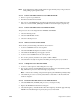
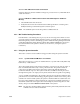
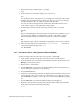
Select the Debug Settings menu and toggle bit 7 (the Manu-Mode bit) to select the System
Controller UART. Refer to Section 4.5.2, “Key Switch in the Manager Position” for more
information on the Debug Settings menu.
2.5.3.2 Communicating with the System over the System Controller Port
TTT provides some commands you can use over the System Controller port.
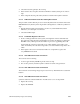
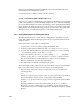
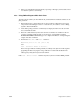
2.5.3.3 Defeating the System Controller
Defeat the System Controller when you suspect a dead controller or bad sensor.
Cycling the key switch while pressing the Execute button allows the System Controller to
come up without starting the power-on sequence. This is valuable if an error such as a
power fault generates a repeating message on the display. The error log can then be
checked and the voltage protection turned off using the Debug Settings menu (refer to
Section 4.5.2, “Key Switch in the Manager Position”).
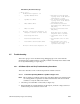
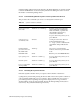
Table 2-2 System Controller Commands
Task Command Comment
Get processor out of
slave mode
<Ctrl>-x s uz<Ctrl>-y Pressing <Ctrl>-xs begins the
select command, u indicates the
CPU slot number, z specifies the
slice number, and <Ctrl>-y
executes the command.
No spaces between keystrokes; do not
press <Enter>.
Select processor to
communicate with
select
x
x is the processor slice. The new
prompt will take the form
POD xx/yy>, where xx indicates the
slot number and yy indicates the
slice.
Put all selected
processors in a slot
into POD mode
<Ctrl>-p All processors selected with the
select command are placed in POD
mode.
Exit POD mode reset Returns you to the PROM Monitor.
Cycle system power <Ctrl>-x c <Ctrl>-y No spaces between keystrokes; do not
press <Enter>.
Reset the system <Ctrl>-x r <Ctrl>-y No spaces between keystrokes; do not
press <Enter>.
Force a non-maskable
interrupt (NMI)
<Ctrl>-x n <Ctrl>-y No spaces between keystrokes; do not
press <Enter>.