
Technical data

6-50 Interactive Diagnostics Environment (IDE)
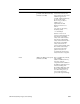
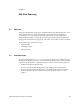
mem11 User-specified pattern/location
write/read test (ported from the
IP17 mem7 test)
Typing mem11 with no
arguments displays a use
message:
Usage: mem11 [-b|h|w]
[-r] [-l] [-v
0xpattern] RANGE
This test is allows the
technician to fill a range of
memory with a specified test
value and read it back, done
as a series of byte (–b),
half-word (–h), or word (–w)
writes and reads. If the –v
option is not used to select the
test pattern, an
address-in-address pattern is
used instead. (–r) will do read
only and will not do any
writes. (–l) will loop forever.
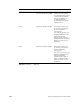
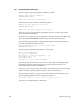
mem12 Decode a bad address into a slot,
leaf, bank or SIMM number
Usage: mem12 [-a
0xaddress] [-b xxxxx]
[-s x]
–b expects a hex number
showing which bits are bad.
For example, if bits 1 and 4 are
bad, enter: –b 0x5
–s1, 2, or 4 for byte, half-word
or word
–b defaults to 0x0 and –s
defaults to 4
For example, to decode
address 0x4000 with bad bits 1
and 4 and it’s a word, type:
mem12 -a 0x4000 -b 0x5 -s 4
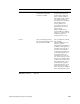
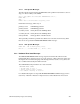
mem13 Byte read/write (slow; 15
minutes/32 MB)
See mem4.
mem14 Read the MC3 configuration
registers.
This is the same as the DMC
command from POD mode.
See also the mem1 command.
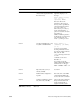
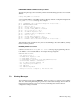
mem15 Double-word March Y pattern
test (4 mionutes/128 MB)
Same as the mem8 command,
but performs double-word
writes/reads instead of
single-word writes/reads.
Test Function Description
Table 6-10 (continued) MC3 Tests