
Technical data


CHALLENGE/Onyx Diagnostic Road Map 5-35
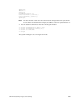
diskless=0
dbaud=9600
sgilogo=y
netaddr=192.48.150.68
ConsoleOut=multi(0)serial(0)
ConsoleIn=multi(0)serial(0)
cpufreq=50
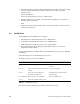
Note: The lines in bold contain the values that must be changed before the system will
boot from the new disk. In this example, the address of the new system disk is “4.”
4. Use the setenv command to enter the following information:
>> setenv systempartition dksc(0,4,8)
>> setenv osloadpartiton dksc(0,4,0)
>> setenv root dks0d4s0
>> single
The system will begin to boot in single-user mode.