
Technical data

5-22 PROM Monitor
Once the system enters POD mode, you should display error registers. Enter the following
command at the POD prompt (POD 03/00>):
devc all
The command devc all displays boards in each EBus slot.
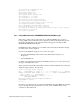
The output looks like this:
Memory size: 64 M
Bus clock frequency: 47 MHz
Virtual dip switches: 0x0000a400
Slot 0x01: Type = 0x31, Name = MC3
Rev: 16 Inventory: 0x00000031 Diag Value: 0x00000000, Enabled
Bank 0: IP 0, IF 0, SIMM type 1, Bloc 0x00000000
Inventory 0x01, DiagVal 0x00, Enabled
Bank 1: Not populated.
Bank 2: Not populated.
Bank 3: Not populated.
Bank 4: Not populated.
Bank 5: Not populated.
Bank 6: Not populated.
Bank 7: Not populated.
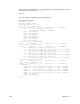
Slot 0x02: Type = 0x00, Name = EMPTY
Rev: 0 Inventory: 0x00000000 Diag Value: 0x00000000, Disabled
Slot 0x03: Type = 0x11, Name = IP19
Rev: 3 Inventory: 0x00000011 Diag Value: 0x00000000, Enabled
CPU 0: Inventory 0x00, DiagVal 0x00, DiagLoc 0x00
Virt. #0, Speed 50 MHz, Cache Size 1024 kB, Prom rev 10, Enabled
CPU 1: Inventory 0x00, DiagVal 0x00, DiagLoc 0x00
Virt. #1, Speed 50 MHz, Cache Size 1024 kB, Prom rev 10, Enabled
CPU 2: Inventory 0x00, DiagVal 0x00, DiagLoc 0x00
Virt. #2, Speed 50 MHz, Cache Size 1024 kB, Prom rev 10, Enabled
CPU 3: Inventory 0x00, DiagVal 0x00, DiagLoc 0x00
Virt. #3, Speed 50 MHz, Cache Size 1024 kB, Prom rev 10, Enabled
Slot 0x04: Type = 0x00, Name = EMPTY
Rev: 0 Inventory: 0x00000000 Diag Value: 0x00000000, Enabled
Slot 0x05: Type = 0x21, Name = IO4
Rev: 2 Inventory: 0x00000021 Diag Value: 0x00000000, Enabled
Window Number: 1
PADAP 1: EPC (0x0e), Inventory 0x0e, DiagVal 0x00, VirtID 0, Enabled
PADAP 2: F (0x0f), Inventory 0x0f, DiagVal 0x00, VirtID 0, Enabled
PADAP 3: F (0x0f), Inventory 0x0f, DiagVal 0x00, VirtID 0, Enabled
PADAP 4: S1 (0x0d), Inventory 0x0d, DiagVal 0x00, VirtID 0, Enabled
PADAP 5: S1 (0x0d), Inventory 0x0d, DiagVal 0x00, VirtID 0, Enabled
PADAP 6: Not populated.
PADAP 7: Not populated.
POD 03/00>