
Technical data

CHALLENGE/Onyx Diagnostic Road Map 5-21
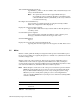
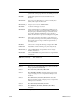
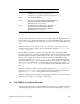
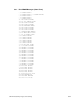
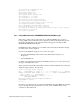
240 CPU writing configuration info.
242 Error in POD command
243 Starting dcache test.
244 Starting icache test.
245 Starting scache (gcache) test.
246 Invalidate I & D caches.
247 Invalidate S (G) cache.
248 Testing CC join counter register.
249 Testing CC writer gatherer register.
250 CPU returning from master’s code to POD mode.
251 Unexpected exception; PROM panic.
252 A nonmaskable interrupt (NMI) occurred.
253 POD mode switch set or POD key pressed.
253 Unspecified diagnostic failure; entering POD mode at user’s request.
254 Diagnostic value unset.
255 Device not present.
5.6.4 Using POD to Examine HARDWARE ERROR STATE Messages
When errors, crashes, hangs, and exceptions occur during PROM power-on tests or
booting, additional error information can sometimes be retrieved using POD mode. The
information described here is the same information that appears in an IDE or IRIX
HARDWARE ERROR STATE display.
In PROM, this format of display is not available in the current release. But the following
procedure can be used to acquire it.
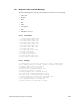
From reset, the PROM bootstrap process occurs in two stages:
• The IP19/IP21 PROM performs machine state initialization and power-on
diagnostics.
• The IO4 PROM boots.
If a failure occurs during the first state, IP19 PROM operations, you see the various error
messages described in this section.
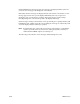
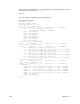
When a system automatically enters POD mode from a CPU board failure, the console may
display messages similar to the following:
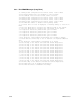
Panic in IP19 PROM: General exception
EPC: 0xffffffffbfc02060 Cause: 0x000000003000801c Status: 0x0000000024417c82
ErrEPC: 0xffffffff80128180 BadVA: 0x0000000010000000 Return: 0xffffffffbfc00f68
Cause = ( INT:8------- <Data Bus Err> )
*** Error/TimeOut Interrupt(s) Pending: 00000100 ==
EBus MyReq Addr Err
Reason for entering POD mode: Unexpected exception.
Press ENTER to continue.
POD 03/00>
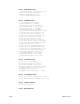
If a failure occurs during in the second state, IO4 PROM booting, the PROM will normally
stop at a prompt until you press Enter. You can also enter an NMI from the System
Controller to enter POD mode.