
Technical data

5-16 PROM Monitor
the IP19 PROM causes the appropriate error message to be displayed. If the system is a
server, the error message is also displayed on the terminal.
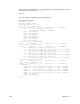
Both status and error messages are displayed in the same format: A short status or error
message appears near the top of the display. Immediately below it, a longer more
descriptive version of the message scrolls by. This longer message is followed by a
three-digit diagnostic code that corresponds to the displayed message.
Status messages scroll by as the machine comes up and will pass so quickly that they will
be difficult to read. A failure causes the corresponding error message to continuously scroll
across the display until the return key is pressed.
Note: If an IO4 failure has occurred, the error message will continue to scroll until the
system is powered down. See Section 2.5.3, “Using the System Controller,” to
redirect the IP19 PROM output to an external port.
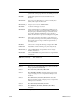
The following sections list the various messages and their diagnostic codes.