
Owner`s manual

Owner's Manual 7
Typical Field Recording Setup
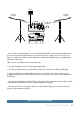
Let's say that your favorite band is in town for their fourth farewell tour (but this time they really mean
it!). Let's also say that they allow their fans to record live shows for posterity. You're in luck! Toss your
laptop, a couple of mics and mic stands, headphones and the Onyx Blackjack into your backpack and
head down to the venue.
Here is how to record the live show in three easy steps:
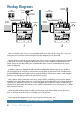
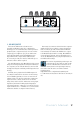
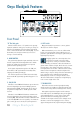
1. Connect everything as shown in the hookup diagram above.
2. Turn the input [gain] knobs up, phones knob up and monitor knob down on the Onyx Blackjack.
3. Start recording the show with the DAW of your choice. And if you want to listen on phones, just
engage the mono/stereo switch and turn the direct monitor send up in conjunction with the headphones.
It's that easy!
If you want to make extra sure that the DAW is capturing the show, simply turn down the direct monitor
send and make sure the DAW is set up to output the signal it's recording.
This setup also works for recording a Podcast, or other field recordings you may want for personal
projects, work assignments and more.
O
N
Y
X
M
I
C
P
R
E
O
N
Y
X
M
I
C
P
R
E
LR
POWERUSBPHANTOM
TO MON
MONITOR PHONES
INPUT
MONITOR
HI-Z
LINE
HI-Z
LINE
STEREO
MONO
GAIN
1 2
SIG/OL
SIG/OL
2 1
MONITOR OUT
BAL/UNBAL
USB
BAL/UNBAL
2x2 USB RECORDING INTERFACE
MAX
OO
MAX
OO
MAX
OO
+45dB-15dB
U
20
30
40
60
GAIN
U
+45dB-15dB
U
20
30
40
60
U
Laptop
Condenser
microphone
Condenser
microphone
Headphones