
Owner`s manual

Owner's Manual 5
Contents
IMPORTANT SAFETY INSTRUCTIONS ........................ 2
QUICK START .......................................................... 3
INTRODUCTION ...................................................... 4
TABLE OF CONTENTS ............................................... 5
HOOKUP DIAGRAMS............................................... 6
FEATURES ............................................................... 8
REAR PANEL ........................................................ 8
1. MIC/LINE INPUTS .................................... 8
2. 1/4" L/R MONITOR OUT ......................... 8
3. USB INPUT/OUTPUT ................................ 8
FRONT PANEL .................................................... 10
4. GAIN CONTROL ...................................... 10
5. SIG/OL LED ........................................... 10
6. HI-Z Switch ........................................... 10
7. TO MON Level........................................ 10
8. MONO/STEREO Switch ........................... 10
9. MONITOR Level ..................................... 11
10. PHONES Level ........................................ 11
11. HEADPHONE OUTPUT ............................. 11
12. 48V PHANTOM POWER Switch and LED .. 11
13. USB LED ................................................. 11
14. POWER LED ........................................... 11
APPENDIX A: SERVICE INFORMATION .................... 12
APPENDIX B: CONNECTIONS.................................. 13
APPENDIX C: TECHNICAL INFORMATION ................ 15
APPENDIX D: USB REVISITED................................. 18
LIMITED WARRANTY ............................................. 19
How To Use This Manual
The first pages after the table of contents are the
hookup diagrams. These show typical setups for fun
times with your interface.
Next is a detailed tour of the entire interface. The
descriptions are divided into sections, just as your
interface is organized into distinct zones:
• RearPanel
• FrontPanel
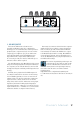
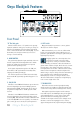
Throughout these sections you’ll find illustrations
with each feature numbered and described in nearby
paragraphs.
This icon marks infor mation that is critically
important or unique to the interface. For your
own good, read them and remember them.
This icon will lead you to some explanations of
features and practical tips. Go ahead and skip
these if you need to leave the room in a hurry.