
Owner`s manual



12 Onyx Blackjack
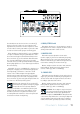
11. HEADPHONE OUTPUT
This 1/4" TRS connector supplies the output to your
stereo headphones. It is the same signal that is routed
to the monitor outputs [2]. The volume is controlled
with the phones knob [10], right next to the monitor
knob [9].
The phones output follows standard conventions:
Tip = Left channel
Ring = Right channel
Sleeve = Common ground
WARNING: Yes, we just mentioned this
exact same warning above, but that is how
important this is...the headphone amp is
loud, and can cause permanent hearing damage. Even
intermediate levels may be painfully loud with some
headphones. BE CAREFUL! Always turn the phones
level control [10] all the way down before connecting
headphones or doing anything new that may affect the
headphone volume. Then turn it up slowly as you listen
carefully.
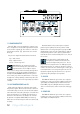
12. 48V PHANTOM POWER and LED
Most modern professional condenser mics require
48V phantom power, which lets the interface send low-
current DC voltage to the mic’s electronics through the
same wires that carry audio. (Semi-pro condenser mics
often have batteries to accomplish the same thing.)
“Phantom” owes its name to an ability to be “unseen”
by dynamic mics (Shure SM57/SM58, for instance),
which don’t need external power and aren’t affected by
it anyway.
Press this switch in if your microphone requires
phantom power. (Always check the position of this
switch before connecting microphones.) A green LED
will illuminate just to the left of this switch to indicate
that phantom power is active. This is a global switch
that affects all mic channels' XLR jacks at once. Yes, all
two of them.
Never plug single-ended (unbalanced)
micro phones, or ribbon mics into the mic
input jacks if phantom power is on. Do not
plug instrument outputs into the mic XLR input jacks
with phantom power on, unless you know for certain it
is safe to do so. Be sure the channel's gain control [4] is
turned down when connecting microphones to the mic
inputs when phantom power is turned on, to prevent
pops from getting through to the speakers.
13. USB LED
This LED will illuminate green when the computer
is powered on and connected successfully and securely
(via USB) to the Onyx Blackjack. Different from the
Power LED [14], the USB light informs you that the
device is "enumerated", and in a functional and happy
state.
14. POWER LED
This LED will illuminate green when the computer
is powered on and connected successfully and securely
(via USB) to the Onyx Blackjack.
POWERUSBPHANTOM
TO MON
MONITOR PHONES
INPUT
MONITOR
HI-Z
LINE
HI-Z
LINE
STEREO
MONO
GAIN
1 2
SIG/OL
SIG/OL
2x2 USB RECORDING INTERFACE
MAX
OO
MAX
OO
MAX
OO
+45dB-15dB
U
20
30
40
60
GAIN
U
+45dB-15dB
U
20
30
40
60
U
4 7 9 10 11
8 12 13 145 6