
Manual

96
ACCESS has the ability to act as a streaming server, delivering AAC and HE-AAC to compable PC-based media players.
Currently tested media players include WinAmp, VLC, iTunes, Windows Media 12, and Windows Media Player with
Orban/CT HE-AAC plug-in.
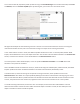
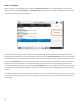
By default, streaming server funconality is turned o. To enable it, go to the tab of the user interface
and choose the opon. Under the rst opon, set to .
Next you will need to choose an encoder for use by the streaming server. Only the encoder choices that are compable
with the players listed are shown in this menu. Choices span between a mono audio feed at 18 kb/s, up to a stereo feed
at 128 kb/s.
Keep in mind that mulple streams will require this bandwidth along with around 25% overhead for each stream.
The , andopons may be set for anything, or le alone. These opons, if applied, will be
embedded into the stream.
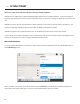
To decode a stream, open one of the supported players and nd the opon to open a URL-based stream. In
Winamp and VLC, input the address of the ACCESS in the following format (the address is merely made up for this
example and used for demonstraon only):
(insert the real IP address, but always use port )
In Windows media, input the address like this:
(using the actual IP address)
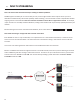
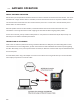
ACCESS can stream while connected to another ACCESS in normal mode. If the BRIC connecon is using an AAC
algorithm supported by players, then when a stream is requested it will be delivered using the same encoder as the BRIC
connecon, regardless of the HTTP sengs. If the ACCESS encoder is Linear or FLAC, the stream request will be rejected.