
Manual

92
ACCESS supports the ability to run one encoder per unit, but this single encoder stream may be sent to up to nine
desnaons simultaneously. We call this capability “mul-streaming”, since the encoder creates a separate but idencal
outgoing stream to each decoder. For example,
if your encoder runs at 35 kbps network ulizaon, sending to two locaons will require 70 kbps upload speed from your
network.
Mul-streaming should not be confused with IP Mulcast, which is described in the IP Mulcast secon on page 94.
Each ACCESS can also run only one decoder, so it’s important that in a mul-stream environment, a maximum of one
stream is sent in the reverse direcon. This means that users interested in hearing a mul-stream must turn o their
encoders.
This can be a bit confusing because mul-streams can be iniated from either end of the link.
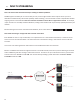
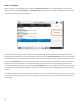
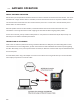
Below is an ACCESS mul-stream arrangement. User A is the mul-streamer, with users B, C and D listening to the same
audio. Addionally, User B is sending a stream back to User A. In order to set up a mul-stream scenario, you will need
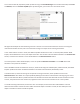
to know how to turn ACCESS encoders . This must be done by building a prole with either the or
mode set to .