
Manual
91
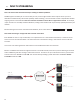
Essenally, the router will get smart enough to read your SIP handshake, nd the outgoing address eld, and replace it
with your public IP. This is a prey slick soluon, but there may be environments where you are not aware whether this
opon is supported on your router, or you may not have the ability to enable it. So on to soluon two:
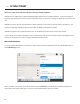
Another technique for working around the SIP-Router issue is by using a protocol called STUN. This can be enabled in
Comrex codecs in the opons and essenally allows for the codec to learn what its public IP
address is. It does this by contacng a STUN server out on the Internet (the default one is maintained by Comrex) and
simply asking. If this opon is enabled, the codec itself will handle the address switching.
Be aware of the dreaded “baling workarounds” issue. In our simple descripon, we le out the fact that ports are
being translated by the router as well as IP addresses. If the ALG-enabled router receives an unexpected result in the SIP
address eld (as it might if using STUN), it may not translate ports as expected, and it’s likely that the call will fail. When
in doubt, the best technique is to try a SIP call with STUN turned o, and if the return channel fails, try enabling STUN.
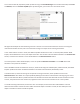
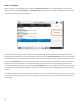
Finally, there’s a brute-force opon available on Comrex Codecs when STUN ports are blocked by a rewall, or can’t be
used for some other reason. Under , a eld is available called . Any address
put into that eld will be pasted into the address SIP eld. So if you know what your public IP address is (you can obtain
it from many websites via a browser) you can manually paste it here. Keep in mind, this is oen subject to change over
me (and obviously if you use a dierent network), so it’s important to remember this change has been made on your
codec.