
Manual

85
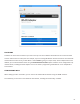
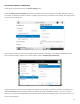
On the NX, go to Connecons under the menu.
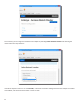
Select the entry and all available connecons will appear on the right. Seng this value to
one of your pre-dened connecons results in conguring the unit for 24/7 operaon to that remote. No conguraon is
necessary on the remote side.
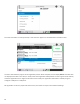
NX has another opon for connuous connecons. When building a new remote on the Remote Connecons menu,
there is a eld for backup opons. One of those opons is called “”.
Using this mode will allow the unit to disregard the meout value and keep a persistent connecon. The dierence is
that the Disconnect funcon sll works and the connecon will not be reiniated on a power re-cycle. This mode is
meant for users who are making temporary connecons, but do not want the system to me out and disconnect in the
event of network failure.