
Manual

74
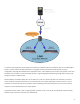
By default, will ulize any network ACCESS senses as capable of carrying reasonable data. If a network
increases in delay and packet loss, ACCESS may decide to remove media data from that network enrely. ACCESS may
sll use the network for background communicaons and error correcon.
’s default conguraon is “Bonding” mode, which is the best for most users. This will sum together the
possible bandwidth of the available networks and send a single media stream, along with background and error
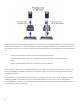
correcon informaon. An alternave mode can be employed, known as “Redundancy”. In this mode, the enre media
stream is replicated on each network (along with background and error correcon info). This mode is preferred only
in environments where both networks have wide network bandwidth and low delay (as in wired networks). Because
Bonding mode is more adapve and has fast recovery capability, it is preferred for wireless networks. To change
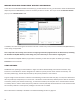
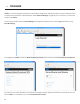
from the default Bonding to Redundant mode, go to and set the value to On for the
entry.
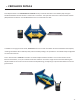
It is recommended that connecons be made in conjuncon with the Switchboard Traversal Server. ACCESS
users can get a Switchboard account for their codecs by contacng Comrex. For conguraon and operaon of
Switchboard for ACCESS, review the previous secon tled .
Switchboard is useful, especially when using , because ACCESS units need more informaon about their
connecon peers than is required in non- connecons. In addion to the desnaon IP address,
connecons require each ACCESS to know the (MAC Address) of the other. This is required as a security
funcon, since establishes a VPN between units. The Switchboard ID of an ACCESS codec is the MAC Address
of the codec.
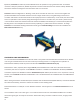
When making connecons via Switchboard, the IP address and the Switchboard ID (MAC Address) is transferred between
the codecs automacally, and doesn’t need to be entered into the iniang codec.
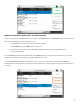
Switchboard delivers a “buddy list” to each ACCESS in the eet. This list appears on the menu of
the NX.
The connecons have a color codec “gear” icon to indicate the status of each other ACCESS or BRIC-Link in the eet.
Items with a green gear are ready for connecon. Yellow means busy, red means unable to connect, and grey means
oine.