
Manual

43
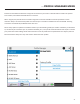
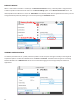
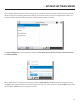
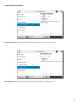
Under the expanded prole, you will also see two addional folders named and Remote.
You’ll use the to determine how your NX behaves, and the will determine how the
ACCESS on the far end behaves.
The and available are idencal, so we will only cover the .
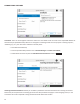
- Under normal circumstances, a connecon will be terminated on one end, and the other end will
drop the connecon. However, if a network failure occurs, or a connecon is ended abruptly for some other reason, the
system will drop the connecon aer a pre-determined me. The default is 60 seconds, but this can be shortened or
lengthened here.
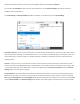
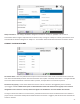
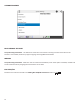
- Using this menu, you can select the encoder used to send audio from this NX (local) as well as the encoder
used to send audio to this ACCESS (remote). The default value of the remote encoder is to follow the local encoder; that
is, it will send exactly the same codec mode it receives. The display will show under the
folder when this mode is selected.
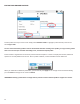
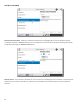
- This opon determines whether the selected encoder (local or remote) is actually sending any data.
By default, all encoders are turned on, but there may be circumstances where one-way operaon is desired. Selecng
under in the folder disables outgoing audio streaming. In the same way, selecng
under in the folder disables the incoming audio streaming from the remote encoder.