
Manual

27
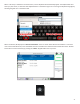
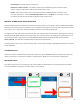
NX connecons are made via the opon in the main menu. Besides giving you list of all possible
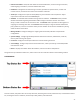
outgoing connecons and acve incoming connecons, the screen displays Switchboard status,
showing whether your NX is currently synced to the Comrex Switchboard server.
Outgoing connecons are made in one of two ways:
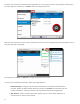
- Connecons via the Comrex Switchboard server are the
easiest to make. Once NX syncs with its Switchboard account, it will display an acve list of other
Switchboard account members. You don’t need to know the IP address or any other info about your
Switchboard members, you simply select one and press “Connect”.
- You’ll need to enter the informaon manually for the
codec you wish to connect to.
Outgoing connecons can be of two types:
- The Comrex CrossLock reliability layer is established to the remote codec
ahead of the call, and disconnected about 60 seconds aer the of the call. Error correcon and
mulple networks are supported.
- Legacy mode to connect with Comrex devices that have older rmware
or don’t support CrossLock for other reasons.
Because there are two ways to connect, and two types of connecons, we’ll discuss all these combinaons, in order from
simplest to most complex.
Outgoing Switchboard connecons are easy. The IP address and CrossLock choice is made automacally by Switchboard.
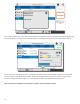
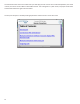
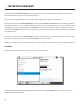
If the Switchboard connecon is acve, you can select any of the Switchboard connecons that appear, and select the
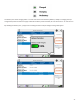
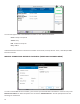
Opons icon on the upper right corner. You can then choose the “” opon and select which prole is used to make
the connecon. Proles determine encoders used and other parameters. If no selecon is made for proles, the call will
proceed with the default prole of Opus mono.