
Manual

23
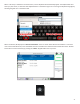
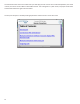
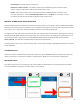
3 - Add, edit and delete connecon desnaons, show incoming connecons,
make outgoing connecons, and check Switchboard status.
4 - Designed to be acve during a live feed, provides microphone mutes, control over
contact closures, and shortcuts to other audio funcons and levels.
5 - Congure the inputs for levels (Mic/Line), buss selecon and mono/stereo. Adjust
output levels and select sources for jack.
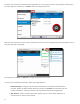
6 - A scrollable view of stascs during acve connecons. The Remote secon provides
detailed informaon regarding the decoder buer manager’s funcons transmit and receive
delays, as well as frame loss and correcon rates. The secon provides real-me graphs of
outgoing and incoming data rates. The secon displays a range of network stascs like
jier, packet loss, and error correcon acvity in each direcon of the stream. Available only during
acve CrossLock connecons.
7 - Congure sengs for outgoing calls like encoder/decoder and specialized
conguraons.
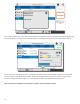
8 - Congure global NX parameters like Contact Closures, Switchboard, CrossLock,
Security and incoming call support.
9 - Congure CrossLock parameters for remotes ulizing CrossLock.
10 - Congure key and touchscreen behaviors, audio input overlay, and enable/disable
restricted user mode.
11 - Displays informaon about NX rmware, licenses and internal temperature.
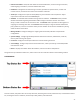
Along with the top and boom status bars, these screens are each outlined in detail in the following secons.
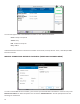
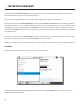
As shown above, every NX screen has the top status bar, describing the currently selected screen, and the boom status
bar, showing the status of networks, CrossLock (if acve), baery and audio levels.