
Manual

20
NX can be powered from its internal baery or an external supply. The internal baery has a low-voltage lockout funcon
that prevents power-up if the baery voltage is too low.
Whenever the external supply is aached, regardless of the whether NX is turned on or o, the internal baery will be
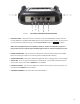
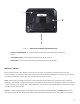
charging. The baery status is always available by looking at the rear-panel baery LED (red = charging, green = full).
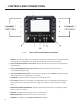
Power up NX by pressing the recessed power buon (le-most on the keypad) for three seconds. The display will “wink”
when NX has accepted the keypress. NX takes approximately 30 seconds to boot, and the display will be blank for part of
the boot cycle.
Aer use, NX is powered down by pressing the recessed power key (le-most on keypad) for three seconds. Note that if
the internal baery is installed and charged, simply pulling the power cord from NX will not result in a shutdown, as the
backup baery funcon will keep NX acve.
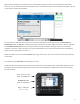
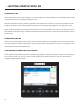
NX has a ve-inch capacive touchscreen for programming sengs and making connecons. It might not respond when
the user wears gloves or tries to use a stylus or other poinng device. Most funcons can also be controlled by the
navigaon keypad below the display.