
Manual

12
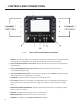
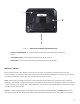
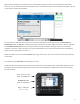
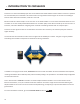
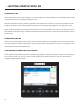
1 DISPLAY - Touchscreen display. This is where you inialize your broadcast from the NX to the studio
unit (typically an ACCESS Rackmount), view and edit sengs, and monitor connecons.
2, 5 Adjusts the level of local audio to the corresponding
headphone jack.
3, 6 Adjusts the level of remote audio to the
corresponding headphone jack.
4, 7 - Use this knob to adjust the level of audio (CH1 and CH2
XLR inputs that you are sending back to the studio).
8 Hold this down for 3 seconds to turn the NX on or o.
9 - Both the F1 and F2 keys are programmable. You can individually assign the keys to
open a specic menu, cycle through menus, trigger one of the four Contact Closures or disable
them.
10 - May be used instead of touchscreen to navigate and select
opons in the user interface.
11 Brings you to the previous screen on the interface.
12 Opens the menu items on the interface.
13 - Navigates to the homepage.