
UPS Operation and Reference Guide R6000
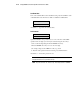

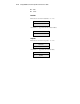
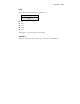
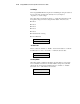
Table Of Contents
- Compaq R6000 Series UPS Operation and Reference Guide
- Notice
- Contents
- About This Guide
- Chapter 1: Introduction
- Chapter 2: Installation
- Chapter 3: Operation
- Chapter 4: Configuration
- Chapter 5: Battery Maintenance
- Chapter 6: Troubleshooting
- Appendix A: Regulatory Compliance Notices
- Appendix B: Electrostatic Discharge
- Appendix C: Specifications
- Index

Configuration 4-17
Set Sync Range ±Hertz
Use this option to set the sync range using the Center and Enter buttons.
■ ±3.0 Hertz for normal mode
■ ±5.0 Hertz for extended mode
Set Sync Range
+/-3.0 Hz
Communications Setup
To configure a serial communication port, select Serial Port 1 or 2 first using
the Center and Enter buttons.
In this example, Serial Port 1 was selected.
Comm Setup
→ Serial Port 1
Serial Port 1
Using the Center button, scroll through the menu and choose which parameter
to view or set by pressing the Enter button.
Serial Port 1
→ Baud Rate
Baud Rate
The current Baud Rate is displayed next to the asterisk (*). Choose the desired
rate from the list of 5 values.
Baud Rate
∗ 1200
■ 1200
■ 2400
■ 4800