
UPS Operation and Reference Guide R6000
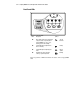
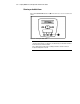
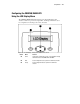
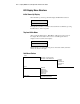
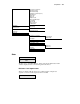
Table Of Contents
- Compaq R6000 Series UPS Operation and Reference Guide
- Notice
- Contents
- About This Guide
- Chapter 1: Introduction
- Chapter 2: Installation
- Chapter 3: Operation
- Chapter 4: Configuration
- Chapter 5: Battery Maintenance
- Chapter 6: Troubleshooting
- Appendix A: Regulatory Compliance Notices
- Appendix B: Electrostatic Discharge
- Appendix C: Specifications
- Index

3-4 Compaq R6000 Series UPS Operation and Reference Guide
Front Panel LEDs
Figure 3-3. Front Panel LEDs
Ref # Description Symbol
1
Green LED; solid green means Operate
or Bypass mode of operation (when
yellow LED (3) is glowing solid),
flashing green means Standby
Smooth
sine wave
2
Yellow LED; lights solidly when the
UPS is on Battery
Battery
3
Yellow LED; lights solidly in Bypass
mode.
Bypass
symbol
4
Red LED is an alarm, warning of
existing or potential problems.
Warning
The front panel has 4 LEDs that indicate the status of the Compaq R6000
UPS.