
UPS Operation and Reference Guide R6000
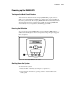
Table Of Contents
- Compaq R6000 Series UPS Operation and Reference Guide
- Notice
- Contents
- About This Guide
- Chapter 1: Introduction
- Chapter 2: Installation
- Chapter 3: Operation
- Chapter 4: Configuration
- Chapter 5: Battery Maintenance
- Chapter 6: Troubleshooting
- Appendix A: Regulatory Compliance Notices
- Appendix B: Electrostatic Discharge
- Appendix C: Specifications
- Index
Operation 3-3
Front Panel Indicators
Front Panel LCD
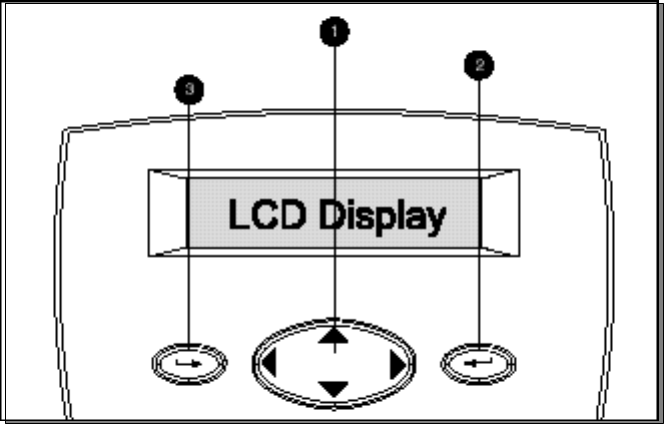
The front panel has a two-line LCD display that guides the user through
operation, configuration and monitoring of the Compaq R6000 UPS. See
section, “Using the LCD Menu to Configure the Compaq R6000 UPS,” in
Chapter 4, for configuration instructions.
Figure 3-2. Front panel LCD display and controls
Control Name Function
1
Center Large 4-way rocking button; used to control navigation through
LCD menu structure: UP, DOWN, LEFT and RIGHT.
2
Enter Used to navigate and select options in the LCD menu structure
3
Escape Used to navigate and deselect options in the LCD menu
structure