
UPS Operation and Reference Guide R6000
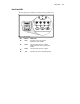
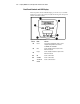
Table Of Contents
- Compaq R6000 Series UPS Operation and Reference Guide
- Notice
- Contents
- About This Guide
- Chapter 1: Introduction
- Chapter 2: Installation
- Chapter 3: Operation
- Chapter 4: Configuration
- Chapter 5: Battery Maintenance
- Chapter 6: Troubleshooting
- Appendix A: Regulatory Compliance Notices
- Appendix B: Electrostatic Discharge
- Appendix C: Specifications
- Index
1-6 Compaq R6000 Series UPS Operation and Reference Guide
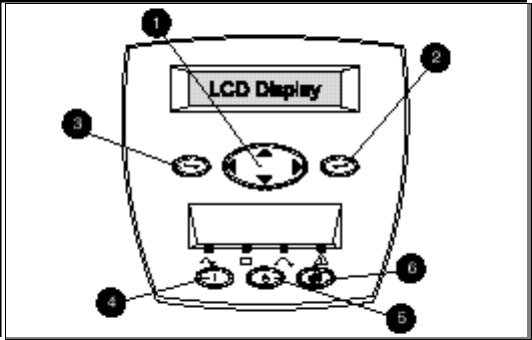
Front Panel Controls and LCD Display
The front panel controls and LCD display provide an easy-to-use UPS
interface for setup, load control, and status monitoring. The front panel
features six button controls.
Figure 1-4. The Front Panel Controls
Control Name Function
1
Center Large 4-way rocking button; used to control
navigation through LCD menu structure:
UP, DOWN, LEFT and RIGHT.
2
Enter Used to navigate and select options in the
LCD menu structure
3
Escape Used to navigate and deselect options in the
LCD menu structure
4
ON Used to control status
5
STANDBY Used to control status
6
TEST/RESET
ALARM
Used to control functions