
Specifications





Diagnostic tools and Setup Utilities 70
Boot menu
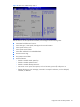
Figure 50 Boot menu of the BIOS Setup Utility
Use this menu to configure the boot settings.
• Boot Device Priority – Use this screen to specify the order in which the system checks for a boot
device.
• USB Device Boot Priority – Use this screen to control the latest added USB Functions by setting the
item to the desired value.
• Embedded NIC Port 1 PXE – Use this screen to configure the embedded NIC Port 1 PXE boot
option. The default value is enabled.
• Embedded NIC Port 2 PXE – Use this screen to configure the embedded NIC Port 2 PXE boot
option. The default value is Disabled.
• NIC1 Port – Use this screen to configure to enable or disable the embedded NIC1 Port.
• NIC2 Port – Use this screen to configure to enable or disable the embedded NIC2 Port.