
Specifications





Removal and replacement procedures 79
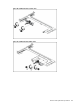
To remove the PCIe riser card:
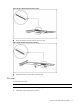
1. Loosen the two screws securing the riser card to the PCI cage.
2. Remove the riser card from the PCI cage.
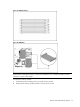
Figure 56 Removing the PCIe x16 Riser Card
Figure 57 Removing the PCIe x8 Riser Card
To install the PCIe riser card:
1. Align the screw holes on the riser card to the screw holes on the PCI cage.
2. Install and tighten the two screws that secure the riser card to the PCI cage.