
Specifications



Removal and replacement procedures 70
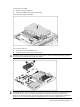
3.
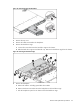
Press down firmly until the processor installation tool clicks and separates from the processor,
and then remove the processor installation tool.
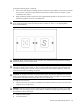
4. Close the retention plate.
5. Lock the load lever.
CAUTION: To prevent overheating or a possible system crash, use only a heat sink model specified
for the HP ProLiant DL160 G6 server.
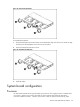
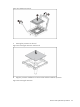
To install the heat sink:
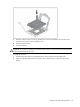
1. Properly align the heat sink spring-loaded screws to the system board mounting holes.
2. Tighten the spring-loaded screws clockwise to secure the heat sink connection to the system
board.